
As I have mentioned from my previous blog post Family Adventure @ Cebu City, Philippines, having a digital notebook was a literal lifesaver! I could jot notes and keep track of the itinerary, budget, and expenses easily.
As a full-time mom who had to make sure everything is prepared and no money was overspent, I had to make sure I have all the necessary ammo for our family trip to Cebu.
Not only was the trip a first time for us to travel with a baby, it was also the first trip we’ve had after 2 years. So, as my mommy brain kicks in full gear to ensure a smooth and enjoyable travel, I went straight to my laptop, opened my Canva account and sharpened my organizing and creativity skills to create my very own DIY Mommy Travel Notebook.
DIY Digital Mommy Travel Notebook
The travel notebook is extremely helpful for several reasons. Whenever my husband or our friends ask anything about logistics, I just get my tablet and show it to them.
Questions answered? Yes!
Will I use this notebook again? Definitely!
Get Your Own DIY Digital Mommy Travel Notebook
Now that I’ve seen how much this digital notebook helped me as a mom, I decided to create a printable template. You can also use this for your family trips. This would definitely help with planning, tracking, and keeping things organized.
You can download my printable PDF and fill in the details on the boxes provided OR you can download my editable Canva template and customize it according to your preference!
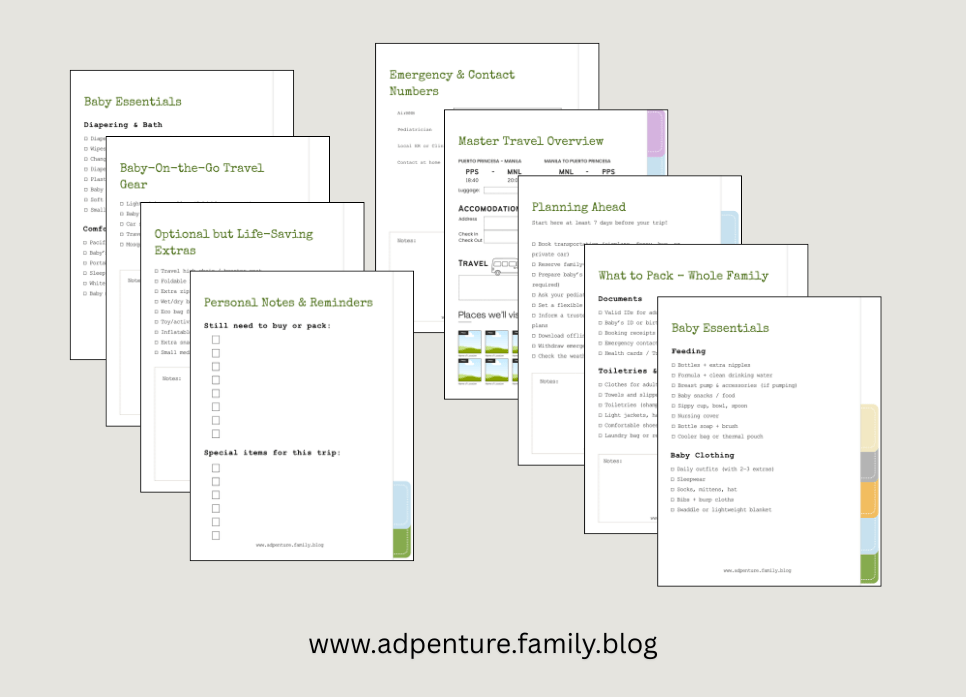
This DIY Digital Mommy Travel Notebook contains the following sections:
- Master Travel Overview. This is basically a summary of everything about our trip. You can put in your flight itinerary, accommodation, land travel, budget, places to visit and expected costs. If you’re using the editable Canva template, ensure you use icons as symbols. Also, use images to shorten the overview into one page.
- Pre-Trip To-Dos. This is your list of things to do in preparation for your trip. If there are additional notes or items for the list, add them to the notes section at the bottom.
- Packing Lists (for the whole family + baby). This space is for the things you need to pack like documents, clothing and toiletries, baby essentials and more.
- Itinerary Planner. You can list down your planned activities and itinerary here. This is the best way to keep track of your itinerary. If there are any changes, just write over it. You’re still good to go!
- Budget Tracker. One of my most visited pages is this. You can make a list of estimated expenses, budget plans, and contributions. This is helpful if you’re planning to split bills. You can also make a chart for a better understanding of the spending. If you’re only downloading the Printable PDF, you can draw your charts or icons on the empty space provided.
- Meal + Snack Planning. This space can be where you plan what and where to eat, what food to buy, etc. If you’re planning to cook meals, you can also make a table in this space. You can prepare snacks for your trip.
- Emergency Contacts & Reminders. If you’re traveling for longer days, this page keeps track of your emergency contacts. You can add contact or address information for nearby hospitals. Include your pediatrician, pharmacy, and other emergency contacts in the area.
- Notes & Mental Space. Finally, this is where I mostly spent my time during the trip to do my liquidation and tracking expenses. Make sure to make use of this space as much as you can. I suggest adding images of important stuff in there for a more organized setup. I like to keep track of expenses, so I added screenshots of e-receipts.
Tips To Making The Most of This Template
- PDF it! If you’re using the editable Canva template, you think you can edit the design. This is necessary if there are any changes in your trip. But I highly discourage that. Although Canva lets you edit on the go, it’s better to download your completed design into a PDF first. Do this before your trip. Any changes in your itinerary can be updated in the notebook. Simply write over it with a pen tool or pen if you’re printing your copy. The goal is to get organized and keep track. Not all travels are perfect; changes are part of the fun! So keep track of that.
- Make it your Own! My template gives you a simple but full package. Yet, you have the liberty to make this more personalized to your needs. Add as many details as you want so you can have the best travel notebook you can have.
- Share with your friends and family! Don’t be afraid to share your plan with your travel buddies. Trust me, they will need this more than you do. How do I know? Well, mine did, and they absolutely loved it!
More To Come…
And now we’re at the end of my post! I appreciate you reading through all of it. While this is just one printable to share, I definitely have more ideas and designs to come!
Do you have any suggestions or tips to make this DIY Mommy Travel Notebook better? Let me know in your comments!


 Adpenture
Leave a comment